
Shopify pre-orders: keep selling before the stock arrives
Updated · SMART Preorder & Back in stock (E-TRADE PARTNER)
SMART Preorder turns your theme's buy button into a Pre-order button when a product sells out, before a launch, or all the time. Each pre-order is a normal Shopify order placed with Shopify's own pre-order purchase option, so you choose full payment or a deposit, a ship date, unit limits and holds, and the app sends the pre-order emails. The app is free on the Shopify App Store.
SMART Preorder & Back in stock is a free Shopify app for pre-orders, deposits, and back-in-stock alerts.
Try it freeOn this page
What a pre-order campaign controls
You set everything in one campaign editor with three tabs: Campaign, Design and Settings. One product can be in one campaign at a time.
| Setting | Your choices |
|---|---|
| Products | Specific products (narrow to some variants with Edit variants), Collections (products added later join automatically) or All products, with Excluded products for the last two |
| Availability | When the product is out of stock (default), Always, Only while the product is in stock or Coming soon (scheduled launch), plus optional Set start date and Set end date in your store's time zone |
| Payment | Full payment (default) or Deposit. Deposits and balances are explained on Pre-order deposits |
| Apply discount | Percentage off or Fixed amount off, applied automatically at checkout. See Discounts with pre-orders |
| Estimated delivery | Ships as soon as possible (default), Ships within a set window (e.g. 2-4 weeks), Ships on a specific date or Ship date not known yet |
| Unit limit | Each variant (default) or The whole campaign; 0 means unlimited. Per-variant numbers are possible |
| Markets | All markets (default) or Specific markets, shown when your store has more than one market. See Markets and locations |
| Mixed carts | Allow (default), Allow, but warn on the product page or Block |
| Inventory | Allow purchases while out of stock (on by default: turns on Shopify's Continue selling while the campaign is live) and Deduct inventory when the order is placed or when it's fulfilled |
| Fulfillment | Unfulfilled (default) or On hold, so nobody ships a pre-order early |
| Tags | Order tags (default "Pre-order") and Customer tags |
| Checkout mode | Standard checkout (recommended) or Simple checkout |
Step-by-step setup: Set up a pre-order campaign and Choose products for a campaign.
What shoppers see
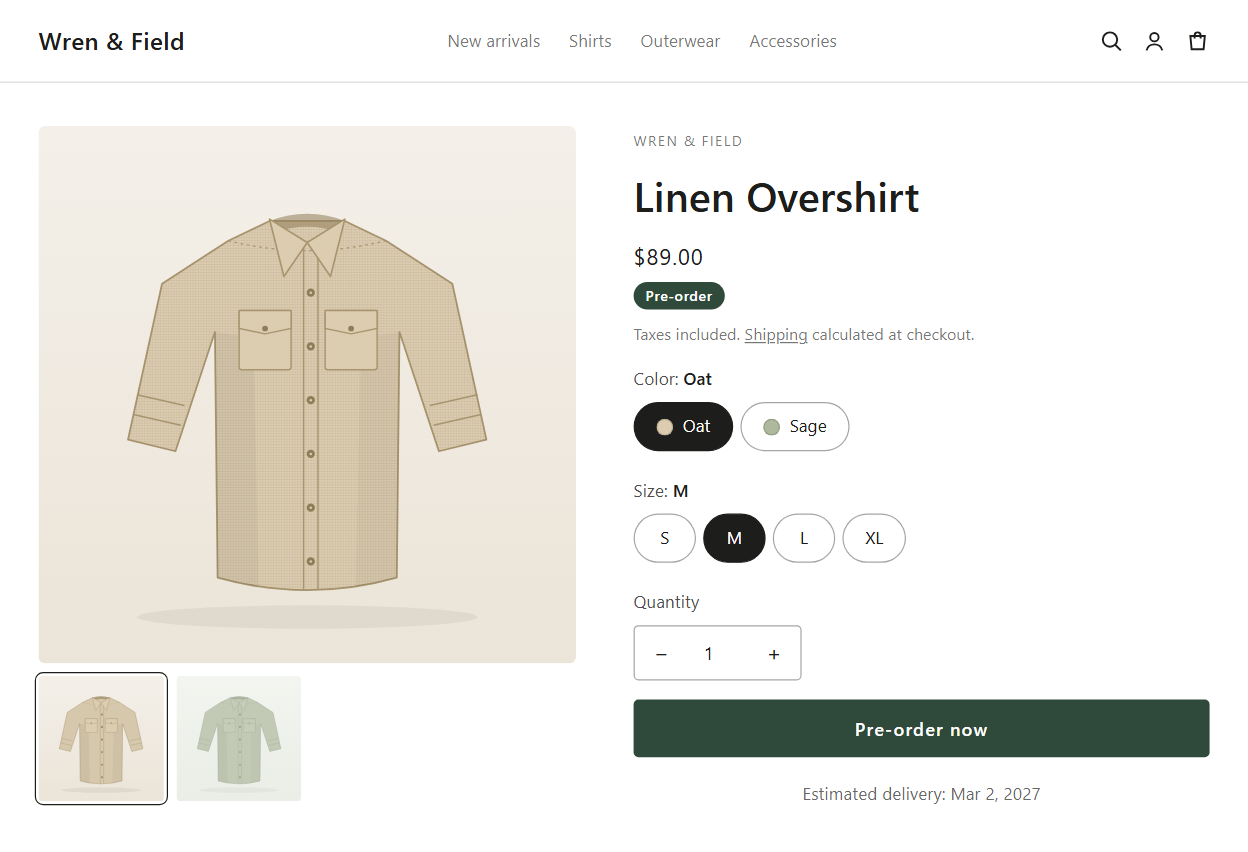
- The Pre-order button. The buy button says "Pre-order now" (your text) and keeps your theme's style unless you turn on Use custom style.
- A delivery line under the button, for example "Ships as soon as possible" or "Estimated delivery" with your date.
- The payment line on deposit campaigns: "Pay {{deposit_amount}} now, {{remaining_amount}} due {{charge_date}}", filled in with real amounts.
- The pre-order price. With a discount, the discounted price shows next to the struck-through original.
- An optional badge ("Pre-order", under the price or on the product image) and an optional Countdown timer ("Pre-order ends in") when the campaign has an end date.
- Coming soon. Before the start date the button reads "Coming soon", with an optional countdown to the launch ("Pre-orders open in").
- Cart and checkout. The purchase option name ("Pre-order") shows under the product, and a line such as "Delivery: Ships as soon as possible" also lands on the order and packing slips.
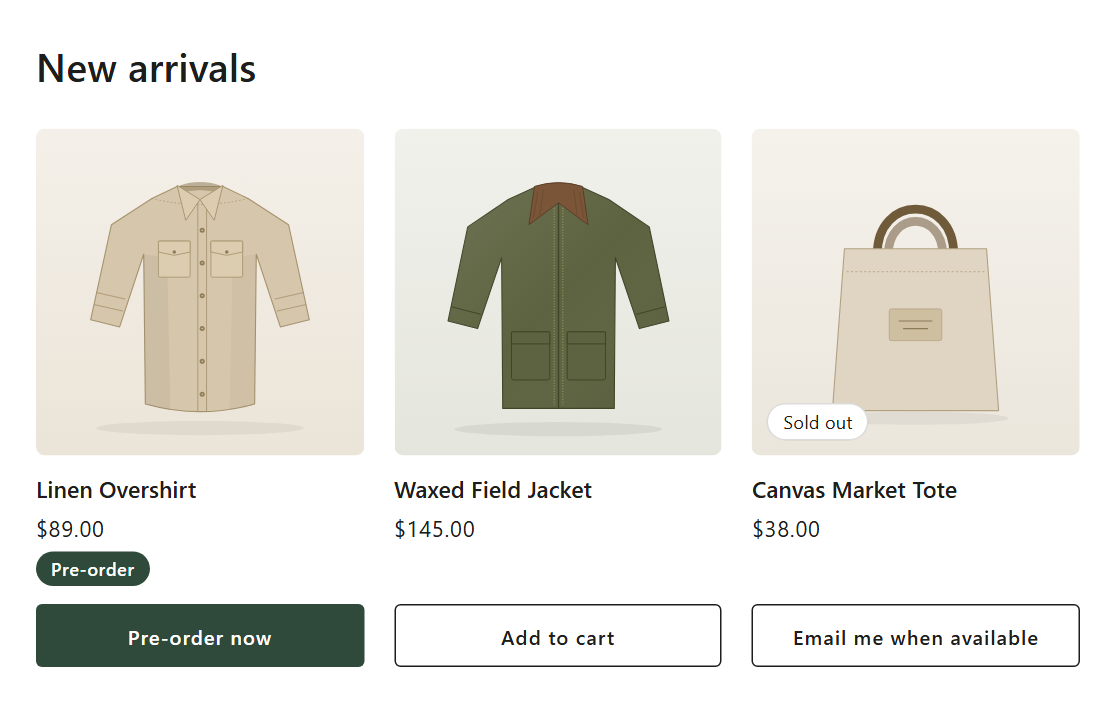
- Product cards. With Show on product cards, collection, search, home and related-product cards show the pre-order text and badge too.
- Buy it now and express checkout buttons are hidden while the Pre-order button shows, so a quick buy can't skip the pre-order.
Design details: Pre-order button, badge and countdown.
After the order is placed
- Orders tab. Pre-orders have their own list with the tabs All, Open, Balance due, Payment failed, On hold, Scheduled, Fulfilled and Cancelled, plus Export CSV. Bulk actions include Collect balance, Send shipping update, Change balance date, Release for fulfillment and Cancel pre-orders. See Manage pre-order orders.
- Emails. Pre-order confirmation (on by default), Shipping update (you send it; the editor offers it when you move a ship date later), Upcoming charge reminder (off by default) and Payment failed. See Pre-order emails.
- Customer cancellation. With Let customers cancel pre-orders that haven't shipped (on by default), buyers get a Cancel pre-order action in their customer account and a cancel link in pre-order emails. It cancels and refunds the whole order.
- Fulfillment holds. On hold campaigns hold each fulfillment order that has a pre-order item. The app releases its holds when a deposit order's balance is paid, on the ship date for paid-in-full orders with Ships on a specific date, or when you release them. See Fulfillment holds and 3PLs.
- Shopify Flow. Triggers Pre-order placed, Pre-order limit reached and Pre-order balance charge failed; actions Collect pre-order balance, Release pre-order holds and Set pre-order campaign status. See Shopify Flow triggers and actions.
How it works with Shopify
Each campaign is a Shopify selling plan group in the pre-order category, with one plan. Shopify's checkout takes the full price or the deposit, saves the buyer's payment method and records when the rest is due. The app handles the rest: the storefront button, the schedule, limits, holds, emails and charging the balance. Shopify's developer docs describe this split in About pre-order and Try Before You Buy.
- Limits are checked at checkout by a checkout validation function called Pre-order limit guard, so a cart can't take more units than are left. See Pre-order limits.
- Payment providers. Shopify's developer docs list Shopify Payments, PayPal Express, Adyen on Shopify and Stripe (Stripe only for some merchants) for pre-orders. Shopify's Pre-orders help page names Shopify Payments and PayPal Express.
- Pre-orders don't need a separate checkout. Buyers check out in Shopify's own checkout like any other order.
Who it suits
- Launches and drops: Coming soon (scheduled launch) with a start date and a countdown.
- Restocks of sold-out bestsellers: When the product is out of stock, so in-stock units sell as usual and the Pre-order button takes over at zero.
- Made-to-order and long lead times: Always, with Ships within a set window (e.g. 2-4 weeks).
- Limited runs: a unit limit for The whole campaign or for Each variant.
- Big-ticket items: a deposit now and the balance later. See Pre-order deposits.
- Stores that also want a waitlist: the same app has back in stock alerts.
Limits to know
- Online store only. Pre-orders work in your online store. On other channels a sold-out variant can still be bought as a normal order, with no deposit, no hold and no pre-order emails. Shopify supports pre-orders only on the Online Store and Custom Storefront channels (Setting up pre-orders).
- Payment methods. Shopify doesn't let buyers pay for pre-orders with Shop Pay, Apple Pay, Google Pay or local methods such as Klarna and iDEAL (Setting up pre-orders). If every payment method, gift cards, Buy X get Y or B2B must work, use Simple checkout, which has no deposits or pre-order discounts.
- No Buy X get Y codes on Standard checkout pre-orders, and no pickup or local delivery: Shopify doesn't support either for pre-orders (About delivery for pre-orders).
- B2B buyers pay in full at checkout. Shopify doesn't offer pre-order purchase options in POS, on draft orders or for B2B.
- No per-customer or per-order limit. Limits count total units, per variant or for the whole campaign.
- One checkout is one order. The app never splits a mixed cart; it can warn or block instead. See Mixed carts.
- Inventory tracking matters. A variant without Track quantity never sells out, so When the product is out of stock never shows the button for it.
- The app embed must be on for the button to show. See Enable the app embed.
Start taking pre-orders
Install SMART Preorder and create a campaign. It saves as inactive, so shoppers see nothing until you activate it and turn on the app embed.
Install free on ShopifyBefore you go live, place a test order: Test a pre-order.
Frequently asked questions
›Can customers cancel a pre-order themselves?
Yes, while nothing has shipped, unless you turn off Let customers cancel pre-orders that haven't shipped in Settings > Deposits and cancellations. Cancelling always cancels the whole Shopify order and refunds it to the original payment method.
›Does the app split an order that has pre-order and in-stock items?
No. One checkout is one Shopify order. Per campaign you can allow mixed carts, warn on the product page, or block them at checkout.
›Why can't shoppers use Apple Pay or Shop Pay on a pre-order?
Shopify doesn't accept Shop Pay, Apple Pay or Google Pay for pre-orders. The app hides those express buttons on pre-order products so shoppers don't hit a dead end. Simple checkout keeps every payment method but drops deposits and pre-order discounts.
›Can I limit how many units one customer pre-orders?
No. Limits count total pre-order units per variant or for the whole campaign. A low unit limit is the closest option.