
Pre-order deposits: take part now, charge the balance later
Updated · SMART Preorder & Back in stock (E-TRADE PARTNER)
In a SMART Preorder campaign, choose Deposit to charge a percentage of the price or a fixed amount per item at checkout. Shopify saves the buyer's payment method, and the app charges the rest automatically a set number of days after checkout, on a set date, or when you fulfill the order. If the charge fails, it retries on your schedule, then emails a payment link or cancels and refunds.
SMART Preorder & Back in stock is a free Shopify app for pre-orders, deposits, and back-in-stock alerts.
Try it freeOn this page
Deposit options
Deposits live in the Payment card on the campaign's Campaign tab. Pick Deposit instead of Full payment.
| Setting | Choices | Default |
|---|---|---|
| Deposit type | Percentage of the price (0 to 99%) or Fixed amount per item | 50%; a fixed deposit starts at 25 in your store currency |
| Collect the balance | A set number of days after checkout (1 to 365), On a set date or When you fulfill the order | 7 days after checkout |
- 0% means pay later. Nothing is charged today; the card is saved and the full amount is collected as the balance.
- A fixed deposit above the item price charges the full price at checkout.
- On a set date charges every order's balance on that date, and pre-orders stop once the date passes.
- When you fulfill the order charges the saved payment method once Shopify shows the whole order as fulfilled. Shipping only part of it charges nothing yet.
- B2B buyers pay in full at checkout.
Setup steps: Take a deposit, charge the balance later.
What the shopper sees
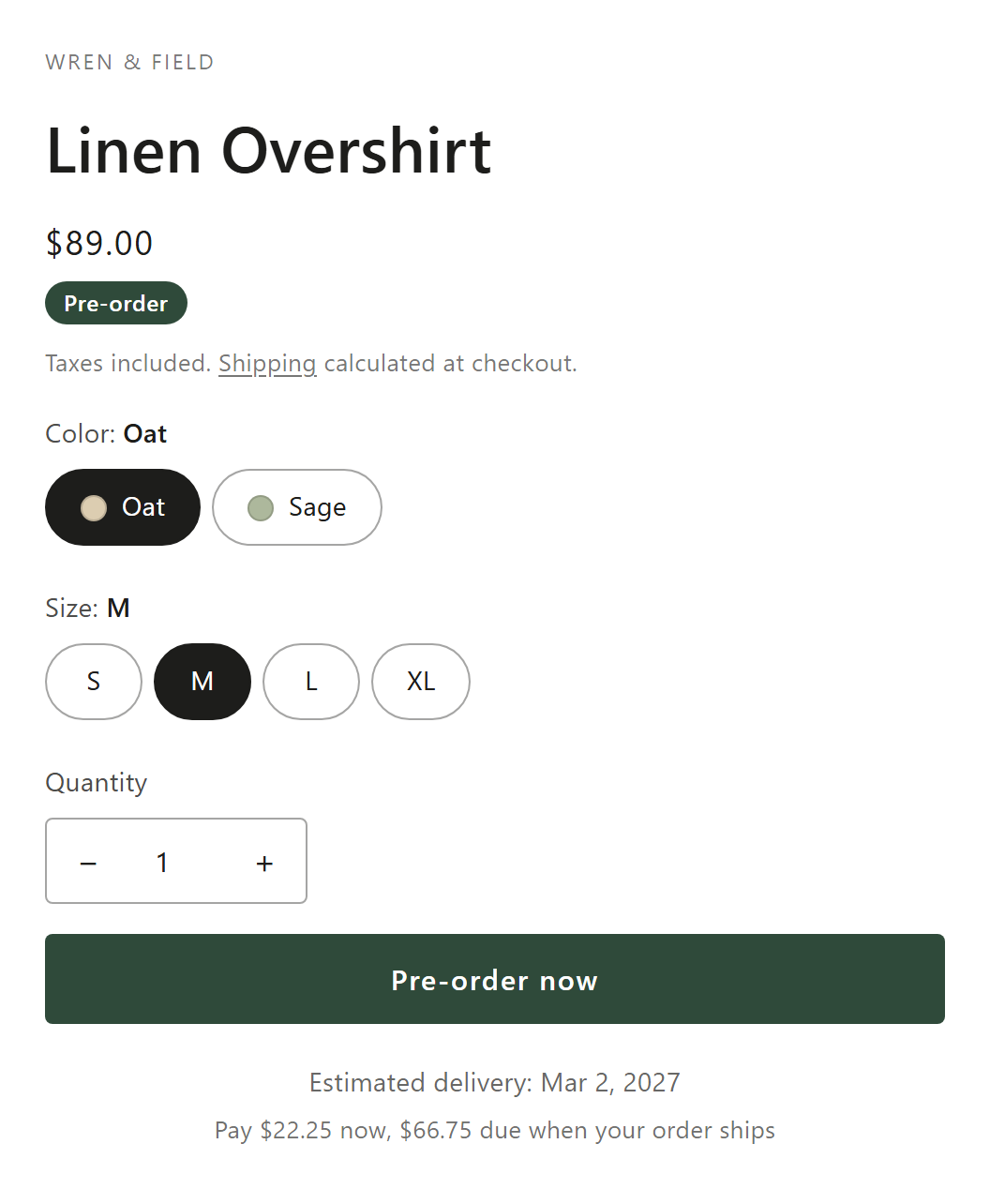
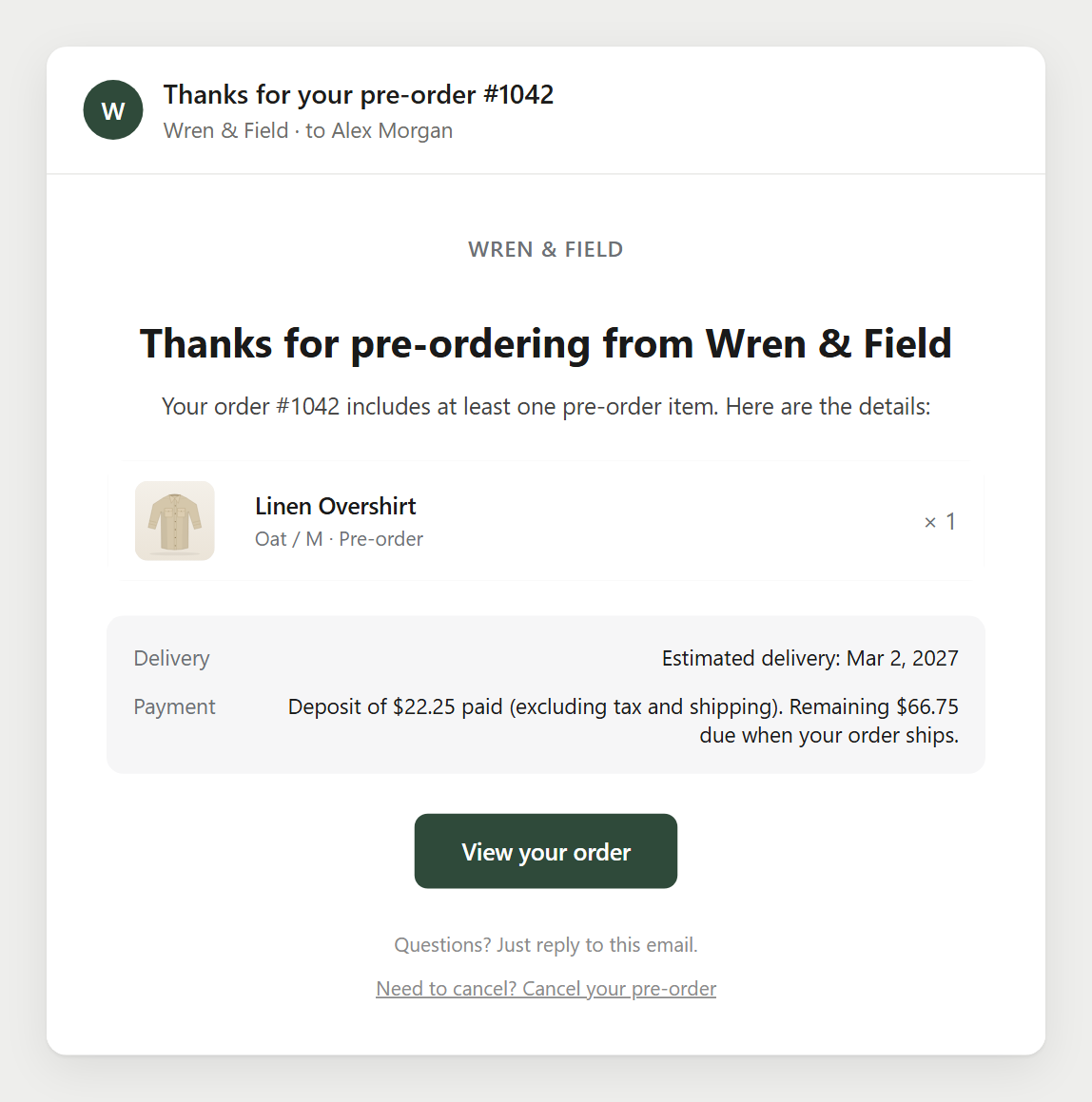
- On the product page, under the Pre-order button: "Pay {{deposit_amount}} now, {{remaining_amount}} due {{charge_date}}", with the real amounts and date. For balances collected on fulfillment, the date reads "when your order ships". You can edit the wording in the campaign's Messages card.
- At checkout, Shopify shows what is paid now and what is due later.
- After checkout, the Pre-order confirmation email. If you turn on Upcoming charge reminder (off by default), buyers also get a reminder before the charge: Send before the charge is 3 days by default, 1 to 30. It isn't sent for balances collected on fulfillment.
How the balance is charged
- At checkout Shopify charges the deposit, saves the payment method and records the due date on the order.
- The app checks for due balances every 15 minutes and charges each one at the first check after it's due.
- Before charging, it reads what Shopify says is still owed. A cancelled order, or one with nothing left to pay (for example paid through the payment link or marked as paid in Shopify), is not charged.
- It asks Shopify to charge the outstanding amount to the saved payment method. Shopify works out that amount, so it includes anything Shopify deferred to the balance, such as shipping on a cart with only pre-order items.
- When the charge goes through, the order shows as Paid in the app's Orders tab, and the app releases its own fulfillment hold on that order.
Details and edge cases: How balance charges work.
When a charge fails
Go to Settings > Deposits and cancellations, card Balance collection:
| Setting | Default | Range |
|---|---|---|
| Charge attempts (the first charge counts) | 3 | 1 to 10 |
| Days between attempts | 3 | 1 to 30 |
| When all attempts fail | Email the customer a payment link | or Cancel the order and refund the deposit (only if nothing has shipped) |
- If the order has more than one saved payment method, retries rotate through them.
- The payment link option sends the Payment failed email with a Complete payment button that opens Shopify's payment page. The app re-checks failed orders daily for 30 days, so a balance paid through the link is picked up.
- The cancel option cancels the whole order, refunds to the original payment method and restocks. An order that already shipped gets the payment link instead.
- Shopify Flow gets a Pre-order balance charge failed trigger with the result Order cancelled or Order kept open.
Charge or move a balance yourself
- Collect balance on an order page charges the saved payment method now, with an option to email a payment link if it fails. The same action works in bulk from the Orders tab, up to 250 orders at a time.
- Change balance date moves the due date of placed orders, one at a time or in bulk. Editing the campaign doesn't move orders already placed.
- The Flow action Collect pre-order balance charges from a workflow.
- Collect balances in the app, not with Shopify's Capture payment: the Pre-orders page warns about this.
How deposits work in Shopify
- A deposit campaign is a Shopify pre-order selling plan with a deferred payment. Shopify adds up the deposits of all pre-order lines and charges them at checkout, and each order has only one deferred due date (About pre-order and Try Before You Buy).
- The saved card is a payment mandate on the order. Charging it at the right time, and handling failures, is the app's job in Shopify's model.
- When a cart has only pre-order items, the buyer pays shipping with the balance, not at checkout (About delivery for pre-orders).
- Shopify doesn't send its own payment reminders for orders with purchase options such as pre-orders (Managing deferred payments). That's why the app has its own reminder and Payment failed emails.
Who it suits
- High-price or custom items, where a full charge months ahead puts buyers off.
- Production with a known date: On a set date charges everyone when the batch is ready.
- Uncertain arrival dates: When you fulfill the order charges only when you ship.
- Reserve now, pay later: a 0% deposit saves the card and charges the full price later.
Limits to know
- Payment providers. Deposits need Shopify Payments, PayPal Express, Adyen or Stripe, as the campaign editor says. Shopify's developer docs note Stripe is available only to some merchants, and Shopify's help center names Shopify Payments and PayPal Express.
- No wallets or local methods. Shopify doesn't let buyers pay for pre-orders with Shop Pay, Apple Pay, Google Pay, Klarna or iDEAL (Setting up pre-orders).
- Standard checkout only. Simple checkout campaigns can't take deposits.
- One deposit, one balance. There are no multi-payment instalment plans.
- When you fulfill the order can't be combined with On hold.
- No partial cash on delivery. The deposit and the balance are both charged to the saved payment method.
Take your first deposit
Install SMART Preorder, create a campaign, choose Deposit and set when the balance is collected. Deposits and pre-orders are free.
Install free on ShopifyFrequently asked questions
›Can I charge the balance before the due date?
Yes. Open the order in the app and click Collect balance, or select orders in the Orders tab and use the bulk Collect balance action.
›What happens if the customer's card is declined?
The app tries again on your Charge attempts and Days between attempts schedule (3 attempts, 3 days apart by default). After the last attempt it emails a payment link, or cancels and refunds if you chose that.
›Is shipping charged with the deposit?
Not when the cart has only pre-order items: Shopify charges shipping with the balance. The app charges whatever Shopify says is still owed, shipping included.
›What if the customer cancels?
With customer cancellation on, the buyer cancels from their account or the email link while nothing has shipped. The deposit is refunded to the original payment method and the balance is never charged.