
How do I take a pre-order deposit and charge the balance later?
Updated · SMART Preorder & Back in stock (E-TRADE PARTNER)
In the campaign's Payment card choose Deposit, set it as a percentage of the price (0 to 99%) or a fixed amount per item, and pick when to Collect the balance: a set number of days after checkout, on a set date, or when you fulfill the order. Shopify saves the customer's payment method at checkout, and the app charges the rest automatically.
SMART Preorder & Back in stock is a free Shopify app for pre-orders, deposits, and back-in-stock alerts.
Try it freeOn this page
What you need
- A supported payment provider. Shopify takes pre-order deposits only through Shopify Payments, PayPal Express, Adyen on Shopify and, for some merchants, Stripe (Shopify developer docs). The deposit option in the editor reminds you of this.
- Standard checkout. On the campaign's Settings tab, Advanced > Checkout mode must be Standard checkout (recommended). Simple checkout sells the item as a normal line, so it can't take deposits.
- If Shopify reports that your store's payments aren't set up for subscriptions, the editor warns you on deposit campaigns: that usually means balances can't be charged later. Check Settings > Payments in Shopify before taking deposits.
Set up a deposit
- Open the campaign (or Create campaign on the Pre-orders page) and go to the Campaign tab.
- In the Payment card, choose Deposit.
- Pick a Deposit type: Percentage of the price or Fixed amount per item.
- Set Deposit paid at checkout. A percentage can be 0 to 99% (default 50%). 0% charges nothing today: the card is saved and the full amount is collected as the balance. A fixed amount is in your store currency and charged per item; if it's more than the item price, the full price is charged.
- Choose Collect the balance: A set number of days after checkout (then Days after checkout, 1 to 365, default 7), On a set date (then Balance date), or When you fulfill the order.
- Optional: edit the Payment message on the Design tab.
- Click Save, then check retries and the final-failure action in Settings > Deposits and cancellations. See How balance charges work.
When the balance is charged
| Collect the balance | Due | Good to know |
|---|---|---|
| A set number of days after checkout | The due date Shopify puts on the order: checkout plus your number of days. | Charged at the app's first check after it's due. Checks run every 15 minutes. |
| On a set date | 12:00 PM store time on your balance date, for every order. | The date must be in the future and after the campaign's start. The campaign stops taking pre-orders when the date passes (status Expired). |
| When you fulfill the order | Once Shopify shows the whole order as Fulfilled. | Shipping part of the order charges nothing yet. No reminder email and no Change balance date. Can't be combined with the On hold fulfillment status, because the hold would block the fulfillment that triggers the charge. |
What the customer sees
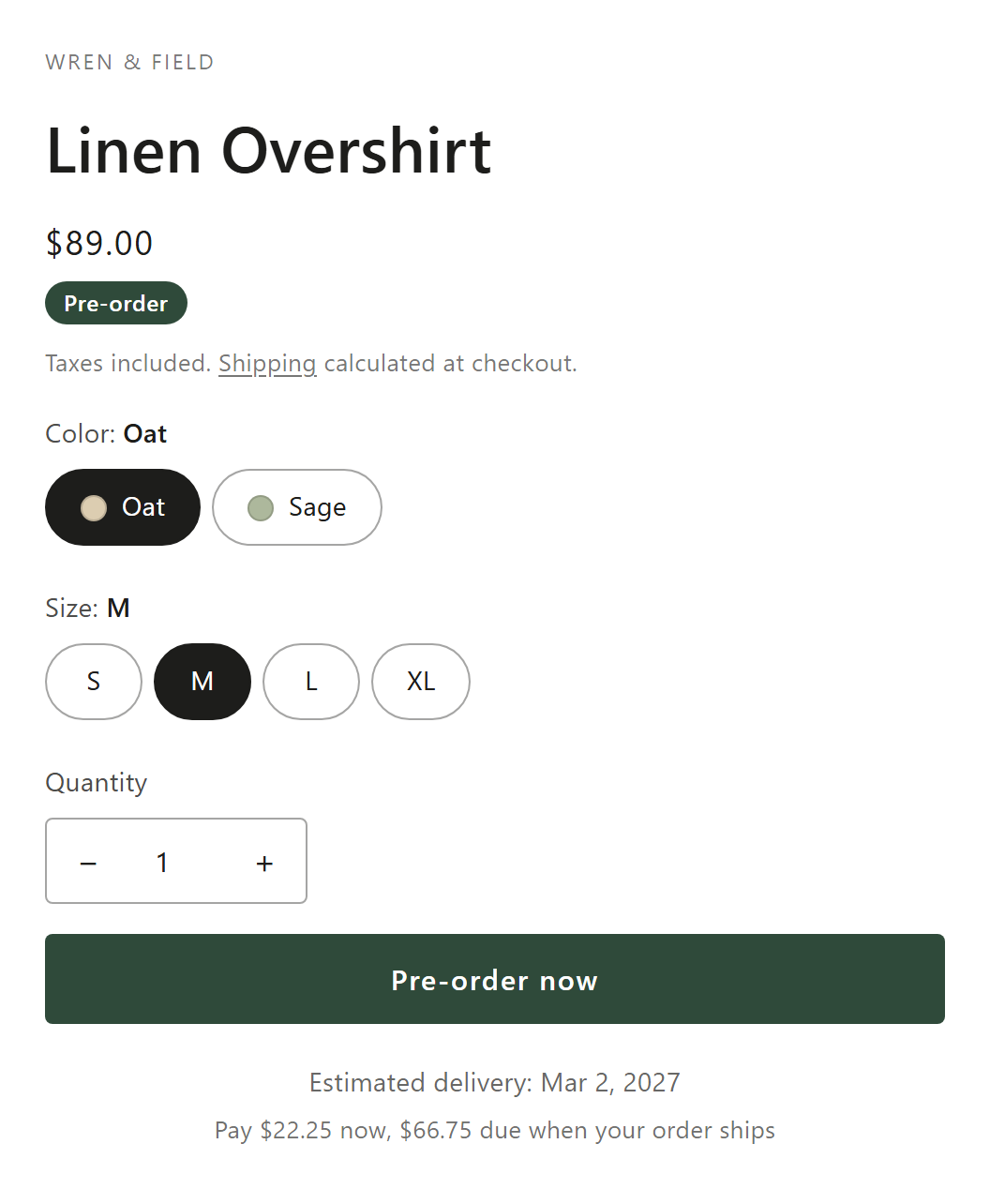
- Product page: the payment message, by default "Pay $50.00 now, $50.00 due Dec 1, 2026". The amounts are Shopify's own deposit figures for the selected variant.
- Checkout: Shopify shows what's due today and when the rest will be charged.
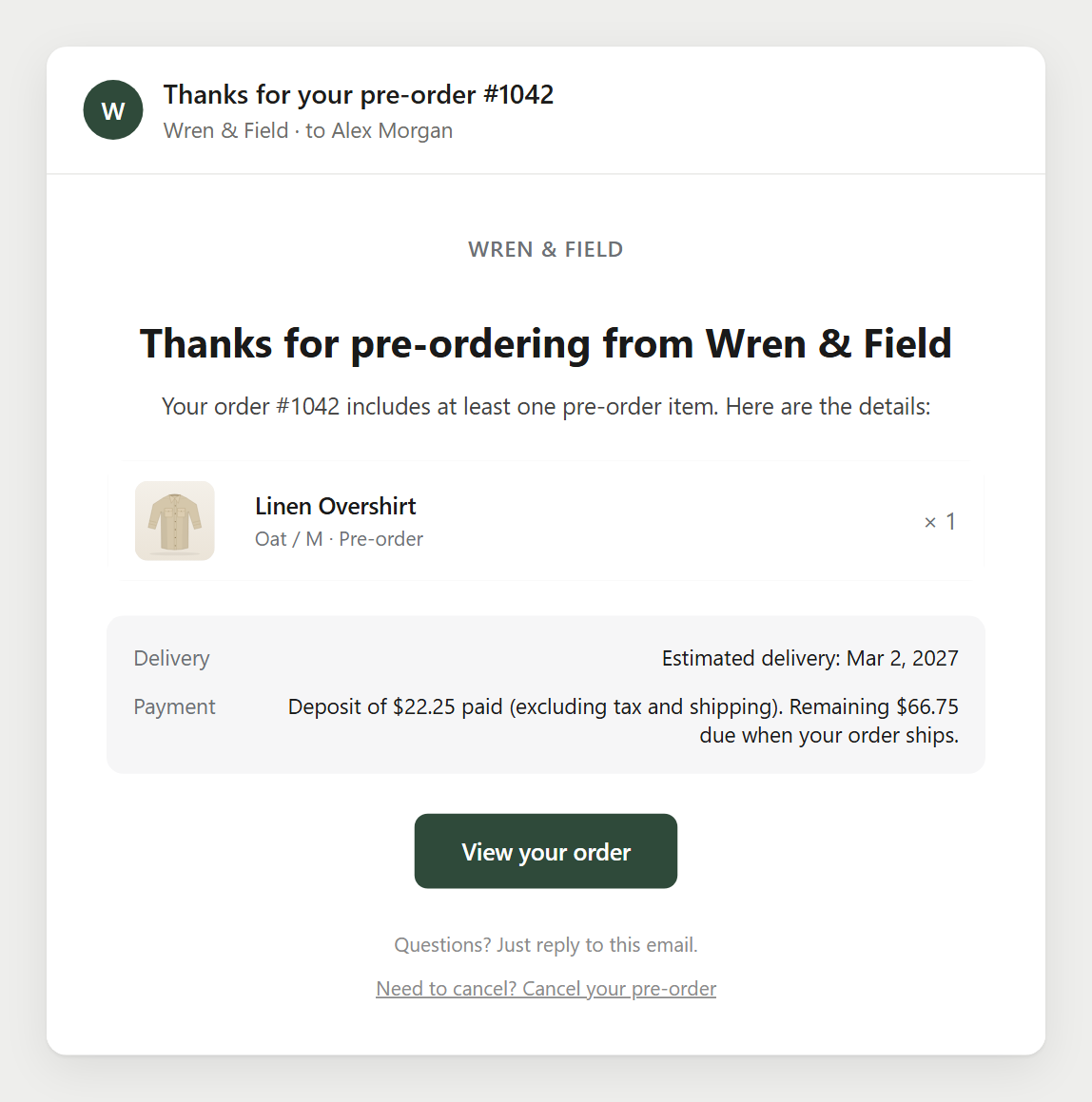
- Pre-order confirmation email: a Payment line such as "Deposit of $50.00 paid (excluding tax and shipping). Remaining $50.00 due on [date]." With a 0% deposit: "No charge today: your card is saved and $100.00 is due on [date]." For on-fulfillment campaigns the end reads "when your order ships". You can edit these sentences in the email.
- Upcoming charge reminder a few days before the charge, if you turn it on (off by default). See Pre-order emails.
Money details
- Shopify works out each pre-order line's deposit from the campaign. With several pre-order items in one cart, the deposits are added together and charged at checkout. In-stock items in the same cart are paid in full at checkout.
- One order has one balance due date. With different dates in the cart, Shopify uses the earliest; if any item's balance is due on fulfillment, that wins (Shopify developer docs).
- If the cart holds only pre-order items, Shopify charges shipping with the balance, not at checkout (Shopify developer docs). The app charges whatever Shopify says the order still owes, so that shipping is included in the balance.
- B2B buyers pay in full at checkout: Shopify doesn't support pre-order purchase options for B2B.
- Shopify's Buy X get Y discounts and gift cards don't work on Standard checkout pre-orders. A campaign discount does. See Discounts with pre-orders.
Collect balances in the app
Shopify's bulk Capture payment can mark deposit orders as paid without charging the card. Use Collect balance in the app, or let the automatic charge run. The Orders tab shows this warning while you have deposit campaigns.
Refundable or not
- Customers who cancel a pre-order themselves always get a full refund to their original payment method. Turn off Let customers cancel pre-orders that haven't shipped in Settings > Deposits and cancellations if your deposits aren't refundable.
- When a balance can't be collected, Cancel the order and refund the deposit refunds what was paid. For non-refundable deposits, use Email the customer a payment link instead and say so in your store policy.
Take deposits on pre-orders
Percentage or fixed deposits, balances charged on a date, after N days or on fulfillment, with retries and payment links. Free on the Shopify App Store.
Install free on ShopifyFrequently asked questions
›Can I take a pre-order with no payment at all today?
Yes. Set a 0% deposit. Nothing is charged at checkout, Shopify saves the card, and the full amount is charged as the balance on its due date.
›Can customers pay the deposit with Apple Pay, Shop Pay or Klarna?
No. Shopify doesn't sell pre-orders through Shop Pay, Apple Pay, Google Pay or local methods such as Klarna and iDEAL. Customers pay by card (or PayPal Express) in the regular checkout.
›I changed the campaign's balance date. Do existing orders move too?
No. Placed orders keep the due date Shopify set at checkout. Use Change balance date on the order page, or in bulk on the Orders tab, to move them.
›Can I charge the balance before it's due?
Yes. Open the order in the app and click Collect balance. It charges the saved payment method right away.